
Standard advice for physical QR safety relies on a broken premise: “Just look at the link before you tap.”
When scanning a physical QR code—whether on an EV charger, parking meter, or payment terminal—the native camera app acts as the executioner. It decodes the payload and presents a tiny preview banner. But because mobile camera parsers prioritize visual aesthetics over input inspection, that preview often renders a visual lie.
Part 1: Combosquatting & the 25-Year Registrar Failure
Domain spoofing isn’t a new threat vector. The transition from early AOL chat-room scams (like the 1995 AOHell toolkit) to financial domain spoofing occurred between 2001 and 2003, starting with attacks against digital-currency processor E-Gold and expanding rapidly to eBay and PayPal. Attackers realized they didn’t need to breach infrastructure to steal credentials; they just needed a lookalike domain. For over two decades, domain registrars have enabled bulk, automated domain registration with zero identity checks or trademark validation.
In modern physical QR attacks, scammers not only spoof domains, they also leverage combosquatting—appending trusted keywords (-pay, -verify, -login, -checkout) to a brand name:
The ‘Truncation Trap’ on Mobile Devices
On a desktop browser, a user might notice the extra hyphenated words in the address bar. On a mobile phone screen, horizontal UI space inside a floating camera banner is severely limited. When the OS preview truncates the tail end of the host string (operator-chargi…), the user sees the legitimate brand name, assumes it’s verified, and taps. The mobile camera UI effectively conceals the host boundary.
Part 2: IDN Homographs & Punycode Parsing
Even when an attacker cannot register a combosquatted domain, they can exploit internationalized domain names (IDNs) via homograph attacks.
Standardized under Punycode (RFC 3492), IDNs allow non-ASCII character sets in web addresses. Cyrillic, Greek, and Latin alphabets share several glyphs that look identical to the human eye (such as swapping a Latin ‘e’ for a Cyrillic ‘е’).
What the Mobile Preview Actually Shows
Here the news is better than you’d expect — and then worse. Desktop browsers force raw Punycode (xn--) to display when scripts are mixed within a single label, and the mobile preview surfaces we tested apply the same defense: scanned with both iOS Camera and Google Lens, our homograph surfaces as xn--oprator-8gg.com, not the visually perfect operator.com. The invisible-Cyrillic trick is caught.
But look at what the user is actually handed: xn--oprator-8gg.com. That isn’t a warning — it’s a riddle. A normal person has no way to know whether that string is a legitimate internationalized domain or an attack, and under a two-second scan on a rain-slicked curb, the natural move is to tap through anyway.
And it does nothing to address Part 1. Combosquatting needs no lookalike characters at all: operator-charging-pay.com is plain ASCII, renders exactly as written, and gets truncated by the same narrow banner. There, the preview has no defense to offer — the destination is a plain-language lie the eye simply can’t finish reading.
Part 3: Programmatic Pre-Execution Inspection
Telling users to “inspect the physical sticker for peeling” or “double-check the domain” fails because most users are not a reliable security line of defense — they expect technology to ‘just work’. And even with a vigilant user, as pointed out above, system-level font rendering and UI truncation make visual inspection impossible. Security must happen programmatically, before the phone executes the QR instruction.
Canary reads the raw QR string and inspects the destination structure before your phone acts on it:
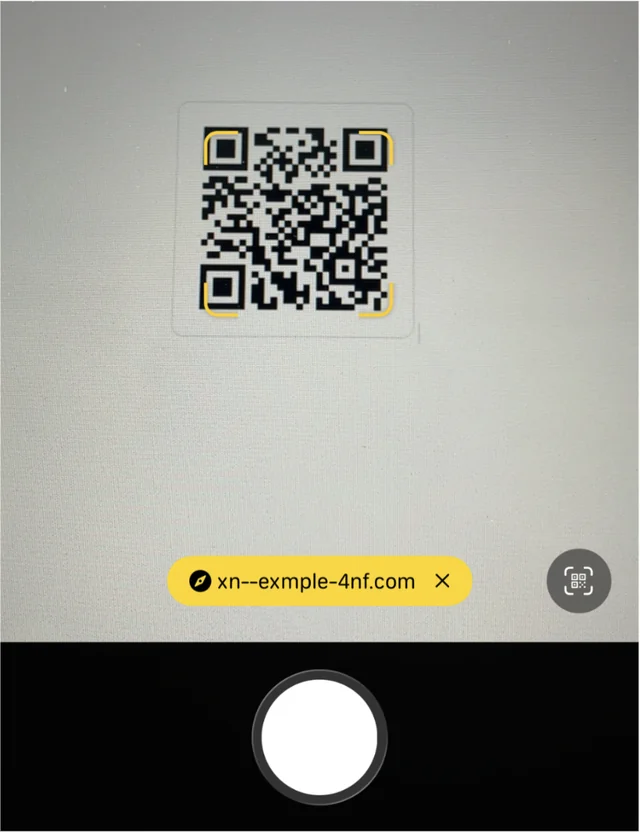
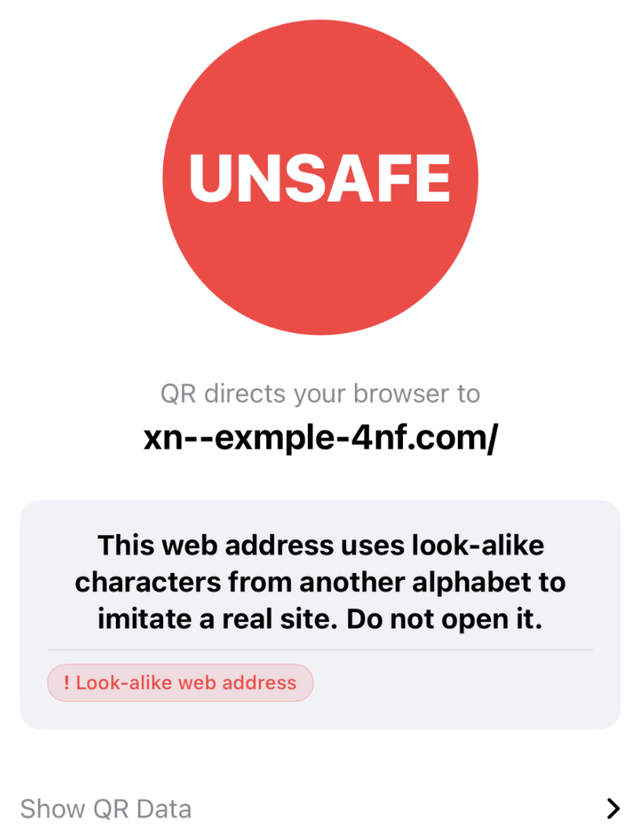
xn--exmple-4nf.com — a riddle. Canary decodes it and tells you what it is.- Look-alike detection: Flags any label that mixes character sets—Latin with Cyrillic or Greek, the homograph signature—with an explicit “look-alike web address” warning. A Unicode disguise that reads as
operator.comgets called out before you tap. - Host-structure analysis: Detects combosquatting patterns—a trusted brand paired with lure keywords (
-pay,-verify,-login) and subdomain padding that buries the real registrable domain—and flags them before browser handoff. - Anonymous reputation proxying: Queries threat databases through Canary’s proxy layer, so the destination is checked without exposing your IP or scan habits to third-party APIs.
Canary presents the user with an unambiguous safety score on what’s behind the scan. And for those who care about the detail, an assessment of the code as well as the raw payload are available. This puts the user in a privileged place — having the relevant context before executing the instruction. A much more reliable environment for using QRs to their full extent.
References & related: Punycode is standardized in RFC 3492. See also: The French EV-Charger Scams Highlight How Dumb Phone Cameras Still Are.
Spotted an error, have a comment, or know a QR case worth a teardown? [email protected]